

The correct sequence for turning the sound system and mixer on and off

A familiar situation: the concert is over, the guests are leaving, and the technical crew begins packing up the equipment. Someone hastily turns off the mixing console or pulls its power cable out of the socket, and suddenly a loud “BANG!” comes from the speakers. The sound is so sharp that it makes even people at the opposite end of the hall jump. Usually, no one pays much attention to it, considering it a normal characteristic of audio equipment. In reality, however, such impulses can place dangerous stress on speakers, especially high-frequency drivers.
For a professional sound engineer, following the correct equipment power-up sequence is as routine as checking microphones before a performance. However, event organizers, mobile DJs, café owners, school technicians, and beginner musicians often skip this step. Remembering just one rule is enough to significantly reduce the risk of damaging a sound system. In three minutes, we will explain why dangerous popping sounds occur, how to start up an audio system correctly, and which mistakes should be avoided during operation.
What Happens Inside a Speaker During a Loud Pop?
Every sound system operates on the principle of sequential electrical signal transmission. A microphone, musical instrument, or laptop generates an audio signal, a mixing console processes it, and an amplifier increases its power to the level required to drive the speakers. Under normal conditions, all these processes occur smoothly, allowing the sound system to reproduce music and speech without unwanted noise.
The problem occurs when power is suddenly applied or disconnected. Capacitors in the mixer's electronic circuits charge or discharge, while operating voltages change. As a result, a brief transient impulse may sometimes appear at the audio output. It may contain a sudden voltage spike or a short-lived DC component that is not part of the intended audio signal. If the amplifier remains active at that moment, it can amplify the impulse and send it to the speakers.
High-frequency drivers, or tweeters, require particular attention. Unlike a low-frequency driver with a relatively heavy moving assembly, a tweeter has a small, lightweight voice coil and a thin diaphragm. Its design is intended for reproducing high frequencies rather than withstanding significant thermal or mechanical overloads. Under unfavorable conditions, a powerful short impulse can cause the voice coil to overheat or damage moving components. However, the nature of the damage depends on the impulse spectrum, crossover design, and speaker protection circuitry. Low-frequency drivers can also be affected.
Modern active speakers are often equipped with limiters, protection circuits, and delayed amplifier activation. However, even the presence of these technologies does not mean that equipment should regularly be subjected to sudden, powerful audio impacts. Following the correct power-up sequence remains the simplest way to prevent unwanted impulses. The principle of “speakers on last, speakers off first” is also established in the recommendations of professional audio equipment manufacturers.
The Golden Rule of Powering Up: From Audio Sources to Speakers
The main principle of professional audio system operation is simple: “Signal sources first, amplifiers last.” This means that equipment should be powered on in the same direction as the audio signal travels. Playback devices are activated first, followed by the mixing console and audio processors, and finally the power amplifiers or active speakers. This sequence allows the electronics to stabilize before the system begins reproducing sound through the loudspeakers.
- Check the volume controls. Before powering on the system, lower the channel faders and the Master fader on the mixer to their minimum levels, and set the Gain controls to safe initial positions. The volume of active speakers should also be temporarily reduced. For example, Maximum Acoustics CONCERTMIX series mixing consoles allow users to control the levels of individual sources and the overall output signal, helping prepare the system for startup without unexpected increases in volume.
- Turn on the audio sources. Laptops, DJ controllers, media players, musical instruments with electronic outputs, and wireless microphone receivers should be powered on first. This is important because some devices may generate brief output noise during startup.
- Start the mixer and processing equipment. Next, turn on the mixing console, equalizers, crossovers, and external audio processors. After startup, it is advisable to wait approximately 3–5 seconds for analog circuits to stabilize and digital processors to complete their initial boot sequence. If a device requires more time, wait until it is fully ready.
- Turn on the amplifiers and active speakers. Only after the preceding components have stabilized should power be supplied to the power amplifiers and active speaker systems. If the setup includes subwoofers and satellite speakers, their internal power-up sequence should be determined according to the manufacturer's instructions and the signal flow configuration. For example, in some systems, the subwoofer is turned on first, followed by the top speakers. The most important rule is that all final amplification devices must be powered on after the mixer.
- Gradually adjust the operating volume. Once the speakers are powered on, the recommended sensitivity or level can be set on the amplifiers and active speakers, after which the Master fader on the mixer can be raised gradually. The “12 o'clock” control position is not a universal standard, so adjustments should be based on the instructions for the specific model, level indicators, and the absence of overload. A properly configured system should provide sufficient volume without constantly triggering the CLIP indicators.
In small concert venues and food service establishments, this procedure takes very little time but significantly improves the predictability of sound system operation. It is especially relevant for setups in which the mixer and speakers are operated by different employees, as a clear procedure helps prevent accidental mistakes.
Correct Power-Down Sequence: Last On, First Off
After an event, the procedure should be performed in reverse order. The most common mistake is turning off the mixer first while leaving the amplifiers or active speakers powered on. At that moment, transient processes at the console outputs can turn into a loud impact through the speakers.
Three consecutive steps are sufficient to shut down the system safely:
- Lower the Master fader on the mixing console to minimum. This removes the intended audio signal from the output and prepares the system for shutdown.
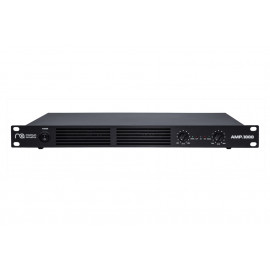
- Turn off the active speakers or power amplifier. For example, if passive speakers are connected through a Maximum Acoustics AMP.1000, this amplifier must be turned off before the mixer. The model uses Class D technology, delivers 2 × 500 W at a 4-ohm load, and includes protection against short circuits, overheating, and overload. However, built-in protection does not eliminate the need to follow the correct operating sequence.
- Turn off the mixer and signal sources. Once the amplifiers are powered down, the mixing console, wireless microphone receivers, laptops, and other devices can be safely switched off.
For cafés, restaurants, auditoriums, and cultural centers, a separate controlled power group for amplifiers and active speakers can be a useful solution. This may be a professional rack-mounted power distributor with sequential output activation or a properly rated power distribution unit with a switch. The main requirement is that the device must support the total electrical load of the connected equipment. A clearly visible label reading “TURN ON LAST / TURN OFF FIRST” should be placed near the switch. This simple reminder is especially useful in locations where sound systems are operated by employees without specialized technical training.
Three Hidden Mistakes That Also Cause Dangerous Impulses
Even the correct power-up sequence cannot protect equipment from every risk if proper connection procedures are ignored during operation. There are three common situations in which a sound system may receive a sudden unwanted signal.
Connecting Cables While the Speakers Are Operating
One of the most common mistakes made by mobile presenters and musicians is connecting or disconnecting audio cables without first muting the corresponding channel. This is particularly relevant to 6.3 mm jack connectors. When a plug is inserted, its contacts may briefly connect different sections of the socket, creating a sudden electrical transient. The result is a characteristic crackling noise or a loud pop through the speakers.
Properly designed balanced XLR connections are more resistant to many types of interference, but this does not mean they can be safely reconnected under all conditions. If a channel is active, even brief contact or interruption of the connection can generate noticeable noise.
Before making any changes to signal cables, activate MUTE on the corresponding channel or reduce its level. If the main system connections are being changed, it is best to turn off the amplifiers beforehand. Speaker cables connecting amplifiers to passive speakers should only be connected or disconnected when the amplifier is powered off.
Switching +48 V Phantom Power
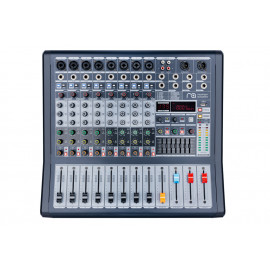
Condenser microphones often require +48 V phantom power, which is supplied through an XLR microphone cable. This function is standard on many professional mixing consoles, including the Maximum Acoustics CONCERTMIX.8, which features discrete microphone preamplifiers, a three-band equalizer, and a built-in DSP effects processor. These features make the console suitable for vocals, presenters, and various audio sources.
However, switching phantom power on or off while a microphone channel is active can sometimes produce a powerful pop. This is caused by a sudden change in electrical potentials within the microphone signal path. Connecting or disconnecting a microphone while phantom power is active is particularly risky when the output signal is already being sent to an amplifier.
To avoid problems, mute the channel using MUTE or lower its fader to minimum before switching +48 V phantom power. After switching, wait a few seconds for the voltage to stabilize before restoring the operating level.
More information about how this function works, microphone compatibility, and safe connection procedures can be found in our article dated September 9, 2026, dedicated to +48 V phantom power.
Improper Operation of Powermix Powered Mixers
Powered mixers, which combine a conventional mixing console and a power amplifier in a single enclosure, require special attention. This design is convenient for school auditoriums, small concert venues, rehearsal rooms, and mobile music setups. It reduces the number of separate devices but requires particular care during startup and shutdown.
For example, the Maximum Acoustics POWERMIX.7008 combines an eight-channel mixer with an amplifier delivering a total power of 700 W, while the POWERMIX.5006 features a six-channel mixing section and a 500 W amplifier. Both models include microphone preamplifiers with phantom power, channel equalization, digital effects processing, and audio playback capabilities from external sources. This allows them to be used with passive speaker systems without a separate external amplifier.
In such devices, the mixer and amplifier sections cannot normally be switched on independently, so the overall volume level must be reduced before power is applied. Before shutdown, the Master control must also be returned to its minimum position. Some powered mixers feature delayed output activation or protective relays that reduce the risk of transient impulses. However, the presence of a specific protection mechanism must be verified in the device documentation.
It is especially important to remember the correct handling of Speakon speaker cables. They must be connected before powering on the powered mixer and disconnected only after it has been completely switched off. This procedure reduces the likelihood of accidental electrical contact and unwanted stress on the amplifier's output stage.
Quick Reference for the Technical Team: How to Power Audio Equipment On and Off Correctly
Whether a small setup for presentations or a full-scale concert sound system is being used, the procedure remains the same.

When building a reliable sound system, attention should be paid not only to speaker power but also to mixer functionality, amplifier compatibility with the connected load, and the quality of cable connections. Our catalog features mixing consoles, amplifiers, and sound reinforcement solutions for various venues, which can be combined according to the requirements of a particular event. Properly selected equipment, together with correct operating practices, will help ensure stable sound reproduction during rehearsals, concerts, presentations, and everyday events.

Leave your comment