

Sound setup for corporate events: Equipment preparation checklist
Corporate events require the sound team to switch quickly between different tasks. During a presentation or an executive’s speech, every word needs to be clear. A banquet calls for comfortable background music, while the entertainment programme requires enough volume headroom for games, a cover band and a DJ set.
Technical mistakes are particularly costly in this setting. Microphone feedback during an awards ceremony or music cutting out halfway through a performance disrupts the programme and affects the sound contractor’s reputation. Preparation therefore begins long before setup, with an agreed schedule, equipment checks and a carefully planned backup.
This checklist will guide you through the key stages, from choosing the PA system to the final checks before the host takes the stage.
Start with the Event Schedule and Venue Plan
Before loading the vehicle, confirm the number of guests, the dimensions of the room, and the location of the stage and dance floor. Ask the organiser for a running order, a list of audio sources and the musicians’ technical rider. Separately, check whether the welcome area, terrace or awards space also needs sound coverage.
Find out how many microphones will be used simultaneously, who will run the presentations and whether any videos are planned. Test the presenter’s laptop in advance: having the right connector does not guarantee that the required audio output is selected in the settings.
Pre-packing check: the event schedule is agreed, the input list is prepared, and speaker positions and available power outlets are identified.
Choose the Main PA to Suit the Room’s Geometry
Glass, tiles and large exposed surfaces make restaurant sound reinforcement more challenging. Simply increasing the volume in such a room often intensifies reflections and reduces speech intelligibility. System directivity and precise placement become especially important.
For these applications, consider a column-format system such as the Maximum Acoustics Clubarray.350. It combines a low-frequency module with a 10-inch driver and a column containing four 3-inch drivers. The column design may help limit vertical sound dispersion over part of the frequency range, but the result depends on frequency, system placement and room acoustics. Installation should therefore always be followed by listening checks in the guest area.
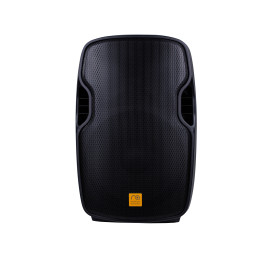
For a multipurpose banquet room accommodating approximately 70–120 guests, a pair of Maximum Acoustics ACTIVE.15 active tops may be worth considering. Each speaker features a 15-inch low-frequency driver, a 1-inch high-frequency compression driver and an amplifier rated at 200 W. This setup can handle speeches, vocals, background music and moderate dance music levels. However, guest numbers are only an initial reference: room area, listening distances and the required sound level also determine whether the system is sufficient.
For a lively dance floor or a live band, plan for a dedicated low-frequency section. The Maximum Acoustics POWERCLUB.18SUB features an 18-inch driver and a built-in 500 W amplifier. The subwoofer adds bass foundation and, with a correctly configured crossover and high-pass filtering for the tops, also reduces the load on their low-frequency drivers. Connecting a subwoofer without frequency separation does not guarantee this benefit.
When setup speed and compact transport are priorities, the Maximum Acoustics ARENA.380 ready-made package is a convenient option. It includes two speakers, a mixer with a built-in amplifier, two stands, connecting cables and two wired microphones. This makes it easier to organise mobile jobs with a predetermined equipment package.
Pre-departure check: inspect the cabinets, grilles, handles and connectors. Listen to each speaker separately using familiar material, check that the high-frequency driver works, and listen for distortion, rattles or other unwanted noises. Clean accessible ventilation openings and heatsinks according to the manufacturer’s instructions.
Leave Spare Channels on the Mixer
A console with every input occupied before the event begins limits your ability to respond to programme changes. An extra wireless microphone, a guest musician’s guitar or a second laptop may be needed without warning.
Allow at least two spare channels, taking input types into account. A stereo source may require two mono channels, while a microphone needs a separate input with a suitable preamp.
The Maximum Acoustics POWERMIX.7008 offers eight microphone preamps, three-band channel EQ and a built-in effects processor. This allows spatial effects to be added for vocal performances, while effects should be removed or substantially reduced during the formal part of the event. The mixer also supports Bluetooth and USB playback, which are convenient for background music. Critical musical cues should also be prepared on a tested wired source.
Set input gain to match actual performance levels. Ask the host to say a few phrases with the same energy they will use when running games. The signal needs headroom before clipping: lowering the master fader does not remove distortion that has already occurred at the input.
When making connections, remember that the POWERMIX.7008 is a powered mixer. Connect active speakers to the appropriate line outputs, and use the built-in amplifier outputs for compatible passive speakers.
Soundcheck check: every channel is tested, spare inputs remain available, levels are set without clipping, and transitions between speeches and the music programme have been rehearsed.
Check the Connections and Assemble an Emergency Case
A cable’s reliability cannot be judged by appearance alone. Damage near a connector may only become apparent when the cable bends, so check cables before departure with a cable tester while gently moving them near the connectors.
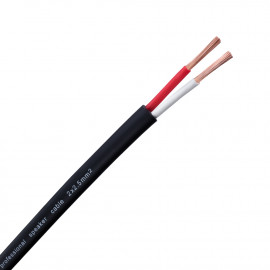
Connecting an amplifier to passive speakers requires speaker cable with an appropriate conductor cross-section. The Maximum Acoustics SPC.225 has two conductors, each with a cross-section of 2.5 mm². The permissible cable length depends on the load impedance and acceptable losses. Use suitable signal cables to carry line-level audio to active speakers.
On cables fitted with Maximum Acoustics SP4 or SP4PRO connectors, check the locking mechanisms, cable jacket clamps and correct pin wiring. Both models are four-pole Speakon-type speaker connectors. Once connected, each connector should be securely retained in its socket.
Right-angle connectors can be useful in tight spaces behind a mixer or controller. The Maximum Acoustics JMRG.BL is a 6.3 mm mono jack connector with a 90° angle. Use it where the connection scheme specifically requires this contact configuration; a balanced or stereo connection requires an appropriate connector. Additional cable restraint helps reduce mechanical strain on the socket.
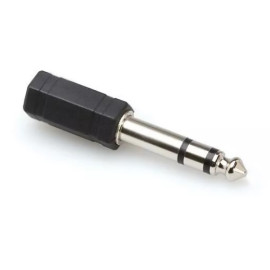
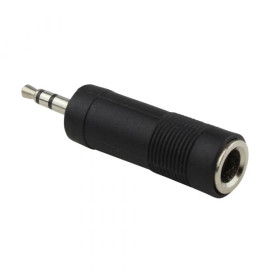
Keep Maximum Acoustics MJS2JS 3.5-to-6.3 mm adapters and JS2MJS 6.3-to-3.5 mm adapters in the backup case. They adapt the sizes of compatible stereo connectors. When connecting a phone or tablet to the mixer, also check the device’s output type and how the stereo signal is routed: a simple adapter does not convert it into a balanced mono signal.
Spare Maximum Acoustics JS65 stereo jack connectors and MIJSR.BL mini-jack connectors are useful additions to a repair kit. During the programme, however, it is quicker to replace a faulty cable with a tested spare and carry out repairs during a technical break.
Pre-packing check: main and spare cables are tested, their lengths and purposes are labelled, adapters are checked, and gaffer tape and protective cable ramps are ready for walkways.
Pay Attention to Stands and Microphones
Guests, photographers and staff constantly move around the stage at corporate events. Speaker stands should therefore be placed on level surfaces, away from main walkways, with their legs properly spread and their height securely locked.
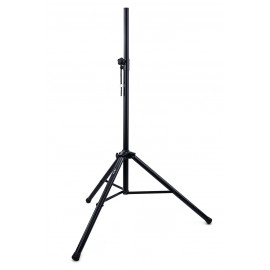
For speakers with a standard pole-mount socket, the Maximum Acoustics MPS is an option. This steel stand has a 35 mm tube and supports loads of up to 50 kg. The Maximum Acoustics SDM.G features a top platform and is designed for compatible small speakers and monitors weighing up to 25 kg. Choose the specific model according to the speaker’s mounting method, dimensions and stability.
Prepare boom microphone stands for vocalists and presenters. The Maximum Acoustics CRANE.15RB uses a heavy metal disc base, while the CRANE.95PRO offers an extended height adjustment range. Before use, check the clamps, threaded connections and balance with the microphone fitted. The boom arm must not drop on its own.
A few spare Maximum Acoustics MHC or MHS microphone clips will help restore a position quickly if the main clip is lost or broken. Check compatibility with the microphone body before departure.
The Maximum Acoustics WSR-BK foam windscreen helps reduce air blasts from plosive consonants. Prepare clean, dry windscreens of the correct size, along with spares. A windscreen does not provide disinfection: windscreen care and microphone cleaning must be carried out separately, following the manufacturers’ recommendations.
Check before guests enter: stands are stable, clamps are secured, cables are not under tension, microphones are clean, and spare clips and windscreens are accessible to the team.
Prepare Additional Zones and an Emergency Backup
The welcome area, photo space or lounge terrace is often separate from the main room. Battery-powered speakers allow sound coverage in these areas without long cable runs through restaurant corridors.
For these applications, consider the Maximum Acoustics Mobi.150MHA or MusicBAND.100. The Mobi.150MHA is a battery-powered system supplied with handheld and headset wireless microphones. The MusicBAND.100 also has a built-in battery and supports Bluetooth and playback from storage media. The choice depends on the area to be covered, the required volume and the intended use.
Such a system can also serve as an emergency setup for announcements or background music. To do so, it must be charged, and the music source and microphone must be capable of operating independently of the main equipment. A battery-powered speaker alone does not protect the rest of the setup from voltage fluctuations or guarantee seamless continuation of the programme.
Test battery operation in advance at the intended working volume. At the venue, keep the backup accessible and agree on a simple switchover procedure with the host.
Backup check: rechargeable batteries are charged, spare batteries are ready, music is available offline, the wired microphone is tested, and a person responsible for emergency switchover is designated.
Perform a Final Walk-Through Before the Start
After setup, walk through the room with a working microphone. Assess intelligibility near the stage, at the tables furthest away and in side areas. Check wireless reception along the host’s route, test presentation audio and make sure the background music does not interfere with conversation.
Separately, check the power supply and ensure the load is suitable for the available circuits. Cable routes across walkways must be protected, equipment ventilation must remain unobstructed, and backup components must be accessible without dismantling the setup.
Event reliability depends on small details. A single damaged cable, flat battery or broken adapter can stop the programme even when the PA system has been well chosen. Systematic checks help identify these problems before the guests hear them.
Prepare your setup in advance! Browse the catalogue of professional PA equipment, and make sure you have spare reliable stands, cables and adapters so you are ready for any challenges at corporate event venues.

Leave your comment